In 2021, we observed a technology boom caused by the pandemic that was boosted by a $2 trillion stimulus. This led to a whirlwind of funding, exits, and values that had never been seen before. We entered an era of growth at all costs, with abrupt cost reductions, tools, and technology consolidation. This shift in efficiency, driven by investments in strategies, tools, and technology, is finally addressing the customer experience challenges throughout the entire lifecycle. Only in the USA are businesses losing $1.4 to 1.6 trillion due to bad customer experience. The unhappy customers say nothing and simply leave. They do not escalate. They do not complain. They do not give your team a second chance. They disappear, and they take their lifetime revenue with them.These are the real consequences of common customer service problems left unresolved and ignored for years. Businesses that want long-term customer relationships and growth in revenue are now investing in AI tools that improve customer experience.In this blog, we will analyze the specific, documented challenges in customer support teams that are costing businesses revenue and accelerating churn. We will also discuss the actionable strategies that need to not only survive in a chaotic business world, but also to thrive in a world that values efficient growth.
Understanding the Scope of the Customer Support Challenges
The Problem
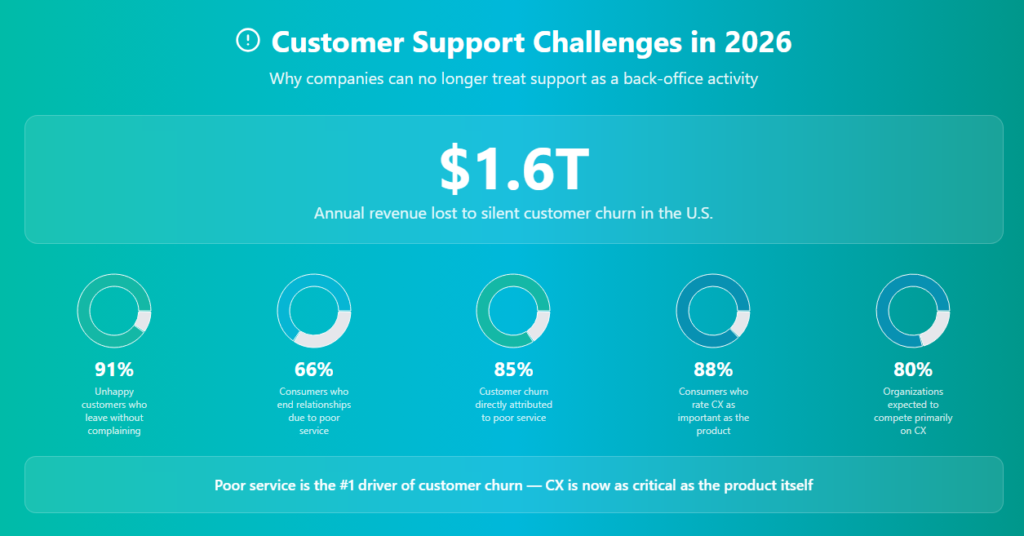
Before examining individual pain points, it’s important to comprehend the overall cost of subpar customer service. These forecasts are not conjectural. The financial and operational realities of customer support failure in 2026 are defined by these industry-validated data, which also illustrate why companies can no longer treat support as a back-office activity.These figures reframe everything. For decades, customer support was treated as a cost center. The data presents an entirely different picture: customer experience is now the key difference in the market, and any company that fails to provide it faces grave risks.
The Silent Leaver Problem 91% of disgruntled consumers just walk away without complaining. Because it produces no warning indication, this type of churn is the most hazardous. Most companies simply monitor the outspoken 9% of customers who express unhappiness. Until it appears in revenue records, the remaining 91% is unseen. The relationship had already ended by then.
Customer Experience Is Now the Product
Nowadays, 88% of consumers think that the customer experience is just as important as the product. An average product given through an amazing support experience is more profitable than a technically superior product delivered through a subpar one.Eighty percent of businesses emphasize client retention and growth. The Skyrocketers take a proactive approach to optimizing revenue potential and putting growth ideas into action. The only purpose is to enhance the quality of the customer service.
The Silent Leaver and the Churn You Cannot See
The Problem
The person sending escalated emails is not your most hazardous client. The consumer who had a bad experience, thought it wasn’t worth complaining, and discreetly transferred their account to a rival company without uttering a word is the most harmful. The distinguishing characteristic of contemporary customer service team problems is that the failures that are invisible are invariably more costly than those that are visible.It’s clear from research that 91% of disgruntled consumers just walk away instead of complaining. Additionally, 66% of customers stop doing business with a company because of subpar customer service. Poor customer service is directly responsible for 85% of all customer attrition, not product failure, pricing, or competition. This has a direct financial impact. assistance.
Why Reactive Support Models Cannot Catch Silent Leavers
Reactive frameworks are the foundation of traditional support operations: a consumer contacts support, the team fixes the problem, and the ticket is closed. Due to its structural blind spot, this model only records clients who voluntarily contact it. A ticket is never issued for silent departures. They decide to leave in privacy after encountering conflict or disappointment. The relationship has already ended by the time this decision appears in your data.The required shift is from reactive to proactive customer support. A strategic approach to customer management is proactive customer health monitoring, which involves anticipating a client’s demands, friction areas, or potential turnover before they need to seek assistance. ProgessArc AI Customer support software uses data to spot patterns in behavior and take early action rather than waiting for a reactive ticket or complaint.
How to Reduce Silent Churn: Practical Steps
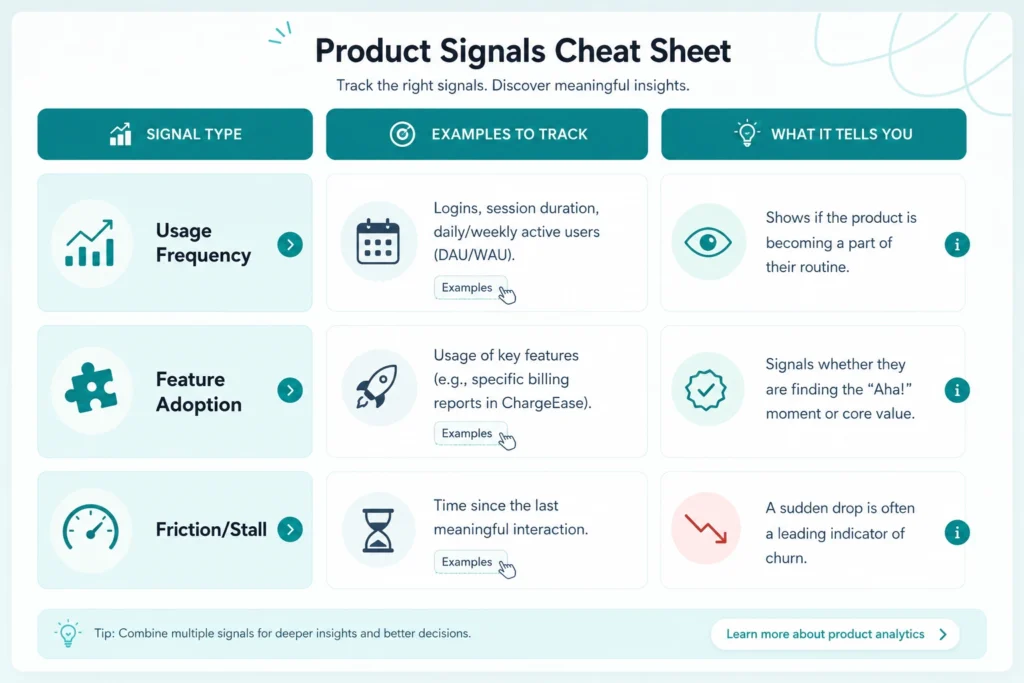
Step 1: Implement customer health scoringBased on engagement signals such as product login frequency, feature adoption depth, ticket history, and communication response rates, give each account a health score. Your early warning mechanism for possible quiet churn is a falling health score within your customer support automation software.Step 2: Conduct micro-surveys following interactionsSend a quick, low-friction satisfaction signal request following each support interaction. A single inquiry, such as “Did we resolve your issue today?” generates a data layer that reveals discontent before leaving and improves AI-driven customer experience insights.Step 3: Flag tickets closed without resolution confirmationAn automated follow-up should be triggered for any ticket deemed resolved without client confirmation. Closed-on-agent-side does not equate to resolved-on-customer-side, and quiet departures arise precisely in this gap within customer support workflow automation.Step 4: Divide the churn analysis based on the history of support interactionsThe support interaction history of each churned account in the ninety days before departure should be examined. The support failures with the highest churn correlation are identified by patterns using AI-powered customer analytics.Step 5: Create a win-back procedure for accounts that are at risk in step fiveInstead of using an automatic email, a professional customer success specialist should initiate proactive outreach when health scores fall below a predetermined threshold. When human outreach is done at the correct time, conversion rates are far greater than those of any automated sequence within an AI chatbot for customer support strategies.
How ProgressArc.io Customer Support Automation Software Solves Answer Inconsistency
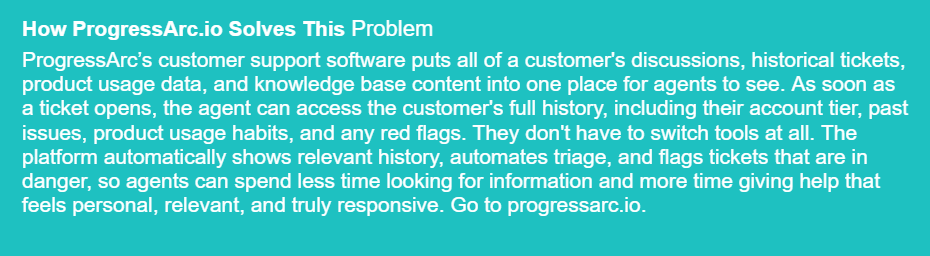
The ProgressArc customer support system integrates your knowledge base, CRM, and product documentation into a single agent workspace. When an agent creates a ticket, your unified knowledge source instantly retrieves the customer’s entire history and the most recent approved responses. Agents cannot give different answers when using the same real-time source.
Section 3: Inconsistent Answers That Destroy Customer Trust
The Problem
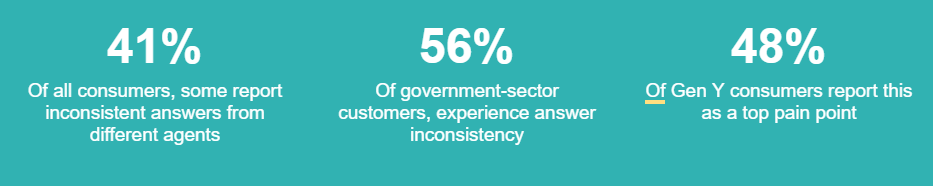
Every client connection is built on trust. And nothing undermines trust more quickly than getting conflicting responses regarding the same problem from various agents. Across all industries and team sizes, inconsistent responses are among the most detrimental and enduring high customer service issues that firms encounter.41% of customers claim that different support representatives have given them conflicting responses. There is a significant psychological impact when a customer is told one thing on Monday and something completely different on Thursday. The client does not draw the conclusion that a single agent made a mistake. They come to the conclusion that the business is incompetent and that whatever response they get could not be trustworthy.In certain industries, this issue is very serious. 56% of clients in the public sector receive inconsistent responses. The percentage rises to 48% among Gen Y consumers, who make up the majority of present and potential clientele. A systemic, pervasive failing that affects all businesses and demographics is inconsistency.
The Root Cause: Knowledge Without Structure
Inconsistent answers are a knowledge management problem. When agents resolve tickets based on personal memory, informal knowledge, or outdated documentation, inconsistency becomes inevitable.ProgressArc AI Chatbot can help with this. Progressarc customer support software consolidates knowledge into a single document that is constantly updated, rather than depending on dispersed or out-of-date information.Agents can easily retrieve responses straight from this centralized system rather than relying on memory. The outcome? Quicker answers, reliable assistance, and no guesswork.
How to Fix Answer Inconsistency in Your Support Team
Step 1: Build and enforce a single source of truthOne centralized, versioned knowledge base must contain all policies, resolution procedures, and product details. With ProgressArc AI Chatbot, this becomes automated. The system ensures that every response is based on the same verified information rather than personal recollection by combining all support knowledge into a single, constantly updated source of truth within AI customer support platforms.Step 2: Implement mandatory knowledge base citation in ticketsProgressArc’s AI guarantees that each response is produced straight from the knowledge base rather than depending on agents to manually cite sources. In addition to ensuring consistent, accurate, and traceable responses throughout all encounters, this establishes inherent accountability in customer support automation workflows.Step 3: Run weekly consistency audits on high-volume topicsProgressArc AI software continuously examines conversations to find inconsistent responses, as opposed to manual weekly audits. It allows teams to make improvements in real time rather than after the fact, reveals gaps, and flags out-of-date information using AI-driven support analytics.Step 4: Standardize responses with AI-driven templatesFor frequently asked questions, ProgressArc’s customer support solution automatically produces consistent, context-aware answers. Regardless of the agent or channel, these AI-driven templates guarantee that every consumer receives the same trustworthy information while maintaining accuracy and enabling customisation in chatbot customer service solutions.Step 5: Establish a knowledge management ownerProgressArc’s AI software functions as an intelligent knowledge manager, constantly updating, organizing, and optimizing material depending on fresh data, queries, and interactions, as opposed to designating a single owner. This ensures that your information base is always current, pertinent, and trustworthy in AI-powered customer service environments.
Ready to eliminate inconsistent customer support answers with ProgressArc customer support software?
Section 4:The Knowledge Gap That Leaves Customers Without Answers
The Problem
When a customer service representative claims they don’t know the answer, can’t locate the information, or provides a response that is inaccurate. It can do more harm than nearly anything else. Of all the difficulties faced by customer service teams, the knowledge gap is the one that customers experience most immediately.34% of consumers report that service representatives are unable to respond to their questions. This increases to 40% among Gen Y consumers, who are the most research-focused, digitally native, and likely to have tried self-service before contacting you.
The Two Dimensions of the Knowledge Gap
Dimension 1 — Missing Documentation: The answer does not exist in written form anywhere in the organization. This happens when products evolve faster than documentation, when tribal knowledge lives only in the heads of senior agents, and when knowledge base maintenance is not resourced or prioritized.Dimension 2 — Inaccessible Documentation: The answer exists, but agents cannot find it efficiently during a live interaction. They search multiple systems, struggle with inadequate search functionality, or lack training to navigate under time pressure. Both dimensions require targeted solutions — accurate diagnosis is the prerequisite to effective remedy.
How to Close the Knowledge Gap
Step 1: Conduct a knowledge audit against your ticket taxonomyCategorize your ticket types and systematically verify whether each category has clear, current, findable documentation. Every category with a documentation gap is a knowledge gap risk that will surface in agent performance.Step 2:Implement AI-powered knowledge surfacingModern AI customer support software can analyze ticket content in real time and automatically surface relevant knowledge base articles, past resolutions, and product documentation — without the agent needing to search manually. This is one of the most impactful applications of customer support automation software available today.Step 3: Build an escalation pathWhen an agent cannot answer, there must be a clear, fast escalation path to someone who can — with a defined response time commitment. The worst outcome is an agent who stalls or guesses because the escalation path is unclear.Step 4: Create a knowledge gap logging disciplineEvery ticket where an agent could not find an answer should be logged as a knowledge gap incident. Weekly review of these logs builds a prioritized documentation backlog that steadily reduces the gap over time.Step 5: Invest in self-service qualitySince 81% of customers attempt self-service first and 31% fail to find answers, the customer-facing knowledge base is as important as the agent-facing one. A strong self-service experience deflects tickets and reduces the volume reaching human agents.
Section 5: The 24/7 Customer Expectations Gap
The Problem
The expectations of customers regarding the availability of help have permanently changed. The idea that support is available five days a week, during business hours, is no longer an acceptable service standard. In fact, many customer support teams are overburdened by demand and unable to scale due to the operational reality of meeting modern expectations.Nowadays, 75% of consumers need round-the-clock assistance. Over 60% of consumers desire this availability across all platforms, including chat, social media, in-app messaging, phone calls, and emails. It is perceived as a deficiency rather than a limitation when these expectations are not met.It takes about 4.2 full-time equivalent workers to provide true round-the-clock human support coverage for a single support function, taking into consideration shift overlaps, days off, sick leave, training time, and turnover coverage. For companies smaller than enterprises, this cost structure is frequently unaffordable.
The Cost Reality of 24/7 Support
The average monthly cost of outsourced customer service services is between $2,600 and $3,400 per representative. It can cost more than $170,000 up front to build an internal 24/7 support capability before a single ticket is resolved. Genuine round-the-clock human coverage is financially unfeasible for the majority of expanding enterprises, despite the fact that 75% of clients need it. A structural solution is needed to close this gap.
Section 6: How to Fix Slow Response in High-Demand Support
The High Ticket Volume Problem
Speed is one of the most visible and emotionally felt dimensions of customer support quality. A slow response is not a data point — it is an experience that shapes how a customer feels about an organization. And for teams dealing with high ticket volume problems, response time pressure is a daily operational reality that compounds every other challenge.40% of support agents report that customers become angry when they cannot complete tasks on their own. These customers arrive at a human agent already frustrated, which means response time pressure is compounded before the interaction even begins. Beneath the surface, a significant structural inefficiency is driving this problem: customer support inefficiency built into the infrastructure itself.
The Efficiency Paradox: 81% of customers try to self-serve before contacting customer support. 31% fail to find what they need. This creates a flow of inbound contacts that were never necessary, contacts that load your team with avoidable high ticket volume problems and push response times up for every customer, including those with genuinely complex issues. Fixing self-service is a support operations capacity decision, not a UX project.
The Hidden Driver: Context Fragmentation
Response time problems have a second, less visible driver that is equally consequential: the time agents spend gathering context before they can respond. The average support agent switches between five to seven different tools during a single customer interaction. Each switch adds latency.The agent opens the ticket, then checks the CRM for account details, then searches the helpdesk for previous tickets, then reviews product usage data in a separate platform, then checks the billing system for account status. By the time they have enough context to compose an accurate response, significant time has passed, and the customer has been waiting. This is not an agent performance problem. It is customer support inefficiency baked into the infrastructure itself.
How to Improve Response Time and Manage High Ticket Volume
Step 1: Unify customer context in one workspace
Put all customer data in one place. This includes chats, tickets, billing, and product usage. Agents don’t switch tools, so they work faster and with fewer delays.Step 2: Use smart ticket triage and routing
Use AI to sort and send tickets to the right agent. This removes delays caused by wrong assignments. It also speeds up resolution time.Step 3: Use AI for first-response drafts
Let AI create draft replies for common questions. Agents review and adjust the response before sending. This reduces writing time and improves speed.Step 4: Improve self-service options
Fix gaps in your help articles and FAQs. When customers find answers themselves, fewer tickets come in. This lowers support load.Step 5: Set clear response time SLAs
Define how fast each channel should respond. Share these targets with the team. This keeps performance clear and consistent.Step 6: Focus on First Contact Resolution (FCR)
Solve customer issues in the first interaction. This reduces back-and-forth messages. It improves speed, efficiency, and customer satisfaction.
Section 7: The Personalization Deficit: Ways to Improve Customer Support That Actually Work
The Problem in Detail
Personalization is now key to customer experience. Customers don’t want to feel like ticket numbers. They want interactions based on their history and relationship with the business.When companies fail at this, customers leave. Research shows about one in three customers leave because the experience feels generic, even if their issue was solved and pricing was fair.Repeating information to a new agent frustrates customers. It wastes their time and makes them feel like their past interactions don’t matter.
Why Personalization Fails: It Is a System Problem, Not a Training Problem
Personalization fails because systems don’t give agents enough context. It’s not just a training issue.Agents can’t personalize support if they can’t see past conversations, purchase history, or product usage. The problem is missing data, not missing skills.
Six Structural Ways to Improve Customer Support Personalization
1. Unify customer data
Give agents one workspace with full customer history, tickets, and product data. This helps them respond with context and accuracy.2. Train agents to use data in conversations
Teach agents to use customer history in real time. They should reference past issues and adjust their tone based on the customer’s situation.3. Segment customers clearly
Group customers by behavior, value, and needs. This helps teams deliver the right level of support to each group.4. Use AI for live context
Use AI to show agents relevant history, patterns, and suggestions during live chats. This speeds up responses and improves accuracy.5. Automate simple queries
Automate basic support questions. This frees agents to focus on complex issues that need a human touch.6. Remove repetition in the system
Stop asking customers to repeat themselves. Make sure data moves across all interactions so agents already know the full story.
Section 8: Why AI Is No Longer Optional in Customer Support Operations
Across every challenge analyzed in this post, customer support AI and automation appear as a core component of every solution. This reflects a structural reality: the scale and speed at which modern customer support must operate exceeds what human-only teams can deliver at acceptable cost.The AI customer service market will reach nearly $48 billion by 2030. Businesses invest heavily in AI support tools because they cannot scale human teams with rising ticket volume. That approach is too expensive and not sustainable for most companies.AI helps companies reduce customer service costs by around 30%. It also improves response times and increases support coverage.This combination of lower cost and better performance is rare. That is why companies are quickly moving from testing AI tools to making them a core part of customer support.
Does Your Business Need an AI Chatbot?
Before evaluating specific AI chatbot software for businesses, every operator should answer the following questions. If you answer yes to three or more, deploying an AI chatbot for customer support is not optional — it is overdue. This is the most practical checklist for assessing whether a chatbot for your customer service team will deliver measurable ROI.
☐ High ticket volume problems — Your team is regularly overwhelmed by volume and response times are slipping beyond your SLA commitments.
☐ Repetitive query patterns — A significant share of your tickets — 30% or more — are variations of the same five to ten questions that could be automated.
☐ Off-hours coverage gap — You cannot staff 24/7 human support but your customers operate across time zones and expect an instant customer support solution outside business hours.
☐ Agent capacity constraints — Agents are spending time on Tier 1 queries that could be automated, leaving less capacity for complex, high-value interactions.
☐ Self-service failure rate — More than 25% of customers who attempt self-service fail to find answers and convert into inbound tickets — feeding the high ticket volume problem.
☐ Response time above target — Your average first response time consistently exceeds channel benchmarks due to queue volume — a signal that a faster customer support solution is urgently needed.
☐ Scaling cost pressure — You need to scale customer support capacity but cannot scale headcount at the same rate — the exact scenario where a scalable customer support solution built on AI delivers the highest ROI.
Conclusion: Customer Support Is Your Most Measurable Revenue Risk
Customer support failure is not a soft problem with soft consequences. It is a measurable, documented, financially quantifiable business risk — one that costs U.S. businesses $1.6 trillion annually and drives 85% of all customer churn.The businesses that win on customer experience in the next five years will not be the ones that spent the most on marketing. They will be the ones that are invested in making every customer interaction — whether handled by a human or an AI, at 3 pm or 3 am, on chat or on phone — consistently fast, consistently accurate, and consistently personal.That is not an aspiration. With the right customer support automation software deployed at scale, it is entirely achievable today.Ready to Eliminate Every Challenge Analyzed in This Post?ProgressArc AI chatbot software offers unified customer context and a complete, scalable customer support solution built for businesses that cannot afford to lose customers silently.→ Visit progressarc.io to get started